
Amazon shipment rejection occurs when inbound inventory fails to meet the platform’s strict receiving standards, triggering delays, returns, or quarantine status that locks up your capital. For Amazon FBA sellers, understanding why Amazon rejects shipments is not optional. A single rejected delivery can stall your entire inventory pipeline, tank your sales velocity, and generate reconciliation headaches that last months. This guide breaks down every major cause of rejection, what happens after a refusal, and exactly how to prevent it from happening again.
What are the most common reasons Amazon rejects shipments?
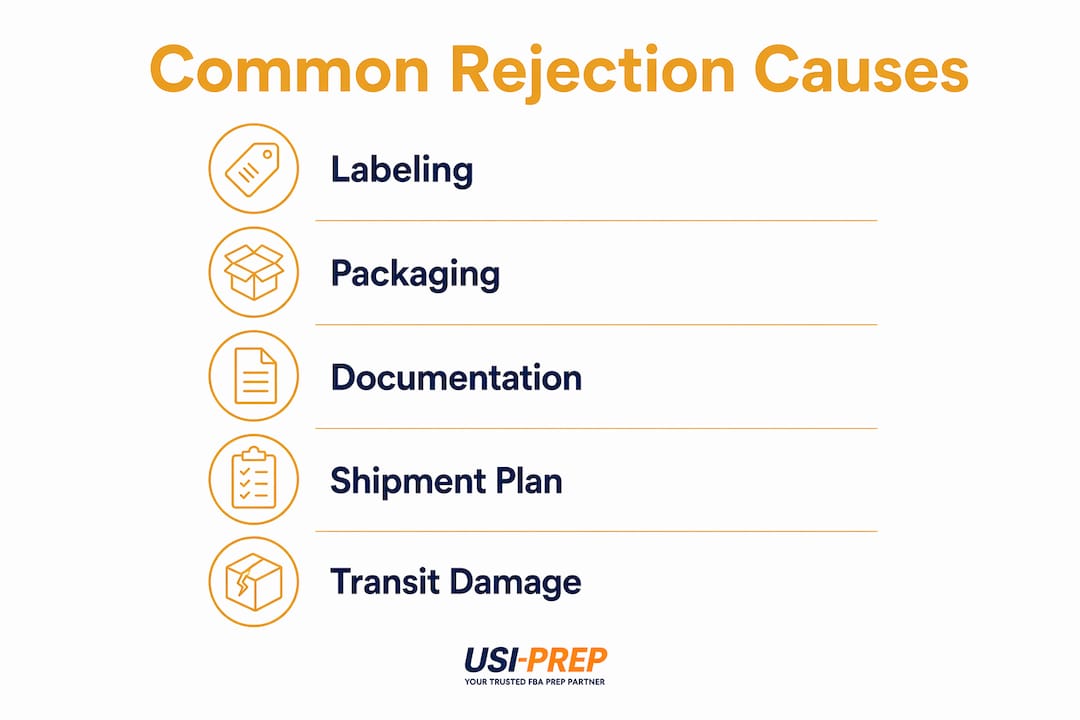
Amazon’s fulfillment centers operate on tight, automated compliance checks. The most frequent reasons for Amazon shipment rejection fall into four categories: labeling errors, packaging failures, documentation gaps, and shipment plan mismatches.
Labeling errors
Incorrect labeling is the single leading cause of FBA shipment refusal. This includes missing or wrong FNSKU labels, using manufacturer barcodes where Amazon requires its own, and placing labels on curved or seamed surfaces where scanners cannot read them. Amazon’s receiving systems are automated, and a label that cannot scan cleanly is treated the same as no label at all. Understanding Amazon’s sticker requirements before you ship is the fastest way to eliminate this category of rejection entirely.
Packaging failures
Crushed cartons, insufficient cushioning, or improper sealing all result in rejection or additional repackaging fees charged back to the seller. Amazon’s FBA packaging standards specify box weight limits, poly-bag requirements for soft goods, and bubble-wrap minimums for fragile items. Beyond individual units, incorrect palletization including unstable stacking or loose stretch wrap causes full pallet refusals at the dock. A pallet that shifts during unloading is a safety hazard, and Amazon’s receiving teams will turn it away on the spot.

Documentation gaps
Missing or incomplete documentation such as invoices, certificates of compliance, or customs paperwork halts processing before a single unit gets scanned. This is especially common for sellers importing goods or selling in restricted categories like supplements, electronics, or children’s products. If your product requires a safety data sheet or a certificate of analysis, that document must travel with the shipment, not follow it by email three days later.
Shipment plan mismatches
Sending more units than declared, mixing SKUs that were not included in the original shipment plan, or routing inventory to the wrong fulfillment center all trigger automatic rejection flags in Seller Central. Amazon’s system cross-references your shipment plan against what physically arrives. Any discrepancy, even a quantity difference of a few units, can cause the entire shipment to be held.
Pro Tip: Before sealing any box, cross-check your physical unit count against your Seller Central shipment plan. A two-minute count now prevents a two-week reconciliation delay later.
How does transit damage cause Amazon delivery rejection?
Physical damage and delivery complications are a separate but equally costly category of shipping problems on Amazon. These rejections happen before your inventory even reaches the receiving dock.
Damage during transit or delivery difficulties, including inaccessible shipping addresses and driver safety concerns, cause undeliverable shipments and outright rejection. A box that arrives wet, crushed, or with broken seals will not be accepted. Amazon’s receiving associates are trained to refuse shipments that pose contamination or safety risks to the warehouse environment.
Late deliveries and missed delivery appointments are another major trigger. Amazon fulfillment centers operate on scheduled dock appointments, and a carrier that arrives outside its window may be turned away entirely. This is not a policy Amazon applies loosely. Missed appointments create downstream congestion, and the center protects its throughput by refusing late arrivals.
The practical implication for sellers is that your carrier choice matters as much as your prep work. Using carriers unfamiliar with Amazon’s delivery protocols, or booking appointments through the wrong portal, creates rejection risk that has nothing to do with your product or packaging. Always confirm your carrier is using Amazon’s Carrier Central or the correct appointment booking system for the destination fulfillment center.
What happens after Amazon rejects a shipment?
The aftermath of a rejection is where many sellers lose the most time and money. Understanding the post-rejection process helps you respond faster and recover inventory sooner.
-
Identify the rejection reason immediately. Log into Seller Central and check the shipment status. Amazon will typically flag the reason, whether it is a labeling issue, a documentation problem, or a plan mismatch. Screenshot everything.
-
Determine whether the shipment is quarantined or returned. Rejected shipments are not always returned. Many enter a quarantine or “problem solve” status that makes them unsellable and ties up your capital until manual reconciliation is complete. This is a critical distinction because quarantined inventory does not appear as available stock, which directly impacts your sales and cash flow.
-
Gather all supporting documentation. Collect your original shipment plan, carrier proof of delivery, packing lists, and any photos taken before shipping. This documentation is your evidence if you need to open a case with Amazon Seller Support.
-
Submit a reconciliation request within the eligible window. Sellers often must wait 2 to 30 days, sometimes as long as 60 to 90 days, before a shipment becomes eligible for reconciliation. That window is not optional. Filing too early results in an automatic denial.
-
Conduct a root cause analysis before reshipping. Do not simply reship the same inventory with the same prep. Identify exactly what triggered the rejection and fix it at the source, whether that means reprinting labels, repackaging units, or correcting your shipment plan.
Pro Tip: Document your shipment with timestamped photos at every stage: packed boxes, labeled units, loaded pallets. This evidence is invaluable when disputing a rejection claim in Seller Central.
Standard Amazon inventory check-in takes 72 hours under normal conditions but can stretch to 7 days during peak seasons. Factor this into your restock planning so a single rejection does not create a stockout.
How can sellers prevent shipment rejections?
Prevention is cheaper than reconciliation. The sellers who rarely deal with Amazon shipment issues are the ones who treat compliance as a repeatable system, not a one-time checklist.
Build a pre-shipment checklist and use it every time. The checklist should cover FNSKU label accuracy, label placement, box weight and dimension compliance, poly-bag and bubble-wrap requirements, pallet configuration, and documentation completeness. A checklist removes the human memory variable from your process.
Train every person who touches your inventory. One undertrained warehouse associate can create a labeling error that rejects an entire shipment. Amazon’s FBA inbound requirements cover hazardous materials classification, pallet standards, and carton marking. Everyone on your prep team needs to know these rules, not just your operations manager.
Verify your shipment plan matches your physical inventory before the carrier picks up. This sounds obvious, but quantity discrepancies are among the most common reasons for Amazon shipment rejection. Count twice, ship once.
Use a prep service with built-in compliance checks. Third-party FBA prep centers that specialize in Amazon inbound requirements catch errors before they reach the fulfillment center. This is especially valuable for sellers who are scaling quickly or managing multiple SKUs across several shipments simultaneously.
The table below compares a reactive approach to shipment management against a prevention-first approach:
| Approach | Outcome |
|---|---|
| Reactive: fix rejections as they occur | Frequent delays, reconciliation waits of 30 to 90 days, inventory lockups |
| Prevention: pre-shipment checklists and trained staff | Fewer rejections, faster check-in, predictable inventory availability |
| Using a specialized FBA prep service | Compliance built into the process, reduced human error, lower rejection rate |
Treating Amazon’s labeling and documentation policies as mandatory requirements rather than suggestions is the single mindset shift that separates sellers with clean inbound records from those constantly chasing reconciliation cases. The cumulative effect of small compliance deviations is what triggers Amazon’s automated rejection flags. A slightly wrinkled barcode combined with a minor quantity discrepancy and a missing certificate adds up to a full rejection, even though no single issue seems serious on its own.
Pro Tip: Use Usiprep’s FBA prep checklist as a reference when building your internal compliance process. It covers the most current Amazon inbound standards for 2026.
Key takeaways
Amazon rejects shipments primarily because of labeling errors, packaging failures, documentation gaps, and shipment plan mismatches, all of which are preventable with consistent pre-shipment processes.
| Point | Details |
|---|---|
| Labeling is the top rejection cause | Missing or incorrect FNSKU labels trigger automatic refusal at Amazon’s receiving dock. |
| Quarantine status locks up capital | Rejected shipments often enter unsellable quarantine status for 30 to 90 days before reconciliation. |
| Transit damage triggers rejection | Wet, crushed, or improperly sealed shipments are refused before they reach the receiving scan. |
| Prevention beats reconciliation | Pre-shipment checklists and trained staff eliminate most rejection causes before they occur. |
| Documentation must travel with the shipment | Certificates, invoices, and compliance papers cannot follow a shipment after the fact. |
Why I think most sellers are solving the wrong problem
Most sellers who come to me frustrated about Amazon rejections are focused on the last shipment that got refused. They want to fix that specific case, recover that specific inventory, and move on. That instinct is understandable, but it misses the real issue.
In my experience working with FBA operations, rejection is almost never caused by one catastrophic mistake. It is caused by a process that has no built-in verification step. The labeling was done by whoever was available that day. The pallet was wrapped by a new hire who had not been trained on Amazon’s specific requirements. The shipment plan was created three weeks before the actual ship date and nobody checked whether the quantities still matched.
Amazon’s automation does not care about intent. It flags deviations. And the sellers who get flagged repeatedly are the ones treating each shipment as a one-off task rather than a repeatable, documented process. I have seen sellers with 10 years of FBA experience get rejections because they scaled their volume without scaling their compliance infrastructure.
The fix is not complicated. It is a checklist, a trained team, and the discipline to use both every single time. Sellers who build that infrastructure stop talking about rejection within a quarter. The ones who keep firefighting individual cases keep losing inventory to quarantine and keep waiting 60 days for reconciliation.
Treat Amazon’s requirements as the floor, not the ceiling. Build your prep process to exceed them, and rejection becomes a rare exception rather than a recurring cost.
— Akbar
How Usiprep helps sellers ship without rejection
Usiprep was built by former Amazon sellers who know exactly what a rejected shipment costs in time, cash, and stress. Every shipment processed through Usiprep goes through a compliance check covering FNSKU labeling, packaging integrity, pallet configuration, and documentation completeness before it leaves the prep center. Sellers using Usiprep report a 30% reduction in fulfillment costs and benefit from a 98.9% on-time delivery rate backed by transparent, real-time inventory visibility. If you are ready to stop chasing reconciliation cases and start shipping with confidence, explore Usiprep’s FBA prep requirements checklist and see how a prevention-first process changes your inbound results.
FAQ
What is the most common reason Amazon rejects FBA shipments?
Labeling errors, specifically missing or incorrect FNSKU labels and improper label placement, are the leading cause of FBA shipment rejection. Amazon’s automated receiving systems cannot process units that do not scan correctly.
How long does it take to resolve a rejected Amazon shipment?
Reconciliation eligibility opens between 2 and 30 days after delivery, but some cases require waiting 60 to 90 days before a claim can be submitted and resolved through Seller Central.
Does Amazon return rejected shipments to sellers?
Not always. Many rejected shipments enter a quarantine or “problem solve” status that makes inventory unsellable and unavailable until Amazon completes a manual review, which can take weeks.
How can I avoid shipment rejection on Amazon?
Use a pre-shipment checklist that covers labeling, packaging, pallet standards, and documentation. Verify your physical unit count matches your Seller Central shipment plan before the carrier picks up.
Can transit damage cause Amazon to reject my delivery?
Yes. Shipments that arrive wet, crushed, or with broken seals are refused at the receiving dock. Missed delivery appointments due to carrier delays also result in rejection at many fulfillment centers.