
If you’ve ever had a shipment rejected or flagged at an Amazon fulfillment center, there’s a good chance a labeling error was the culprit. Understanding how Amazon sticker requirements work is not optional for FBA sellers. It’s the difference between inventory that flows through the system cleanly and inventory that gets quarantined, relabeled at your expense, or sent back entirely. This guide breaks down every label type, the exact specs Amazon expects, and the practical steps that keep your shipments moving without friction.
Table of Contents
- Key takeaways
- How Amazon sticker requirements work: the core label types
- Label specs and placement best practices
- Labeling products and cartons for different shipment scenarios
- Understanding the Amazon Transparency Program
- My take on where sellers actually go wrong
- Let Usiprep handle your Amazon labeling compliance
- FAQ
Key takeaways
| Point | Details |
|---|---|
| FNSKU labels are mandatory | Each sellable unit needs an Amazon-generated FNSKU label that fully covers any manufacturer barcode. |
| Print quality directly affects scan rates | Use a minimum of 300 DPI on matte, non-reflective paper to prevent barcode scanning failures. |
| One carton label per outer box | A single FBA shipment ID label on the outside is all that’s needed, regardless of how many units are inside. |
| Transparency codes require early integration | Serialized 2D Data Matrix codes must be applied to every unit, ideally during production, not after. |
| Placement rules are specific | Labels go on flat surfaces, at least 1/4 inch from edges, never on seams or openings. |
How Amazon sticker requirements work: the core label types
Amazon’s fulfillment system relies on a layered labeling structure. Each label type serves a specific function, and confusing them is one of the most common and costly mistakes sellers make.
FNSKU labels are the foundation. Each sellable unit in Amazon FBA must carry an Amazon-generated FNSKU label that links the product directly to your seller account and listing. This is not the same as a UPC or EAN barcode. The FNSKU is Amazon’s internal identifier, and it’s what keeps your inventory separate from other sellers’ stock of the same product.
Box content labels are 2D barcodes placed on the outside of cartons. They tell Amazon’s receiving team exactly what’s inside without opening the box. These are generated through Seller Central when you create your inbound shipment plan, and they’re required for every carton you send.
Shipment and carton ID labels are the routing labels. They tell Amazon which fulfillment center a box belongs to and which shipment it’s part of. Only one FBA carton ID label per outer box is required, regardless of how many individually labeled units are packed inside.
Pallet labels apply when you’re shipping on pallets rather than individual cartons. These go on all four sides of the pallet and are required for LTL and FTL shipments.
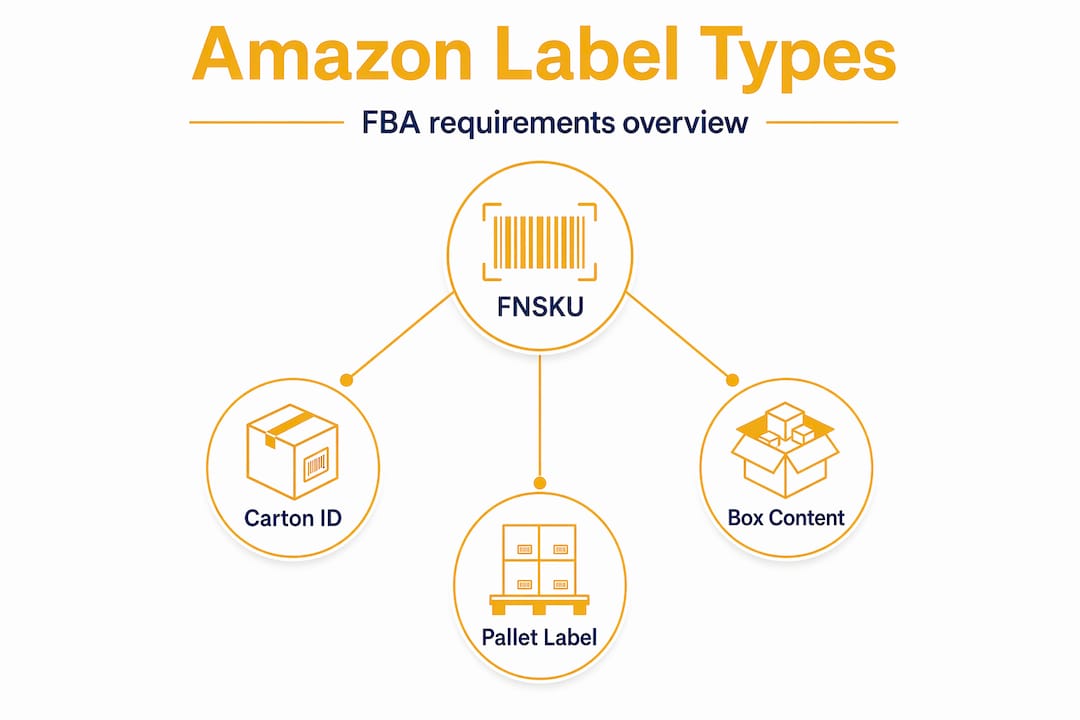
Here’s a quick comparison of the main label types:
| Label type | Purpose | Who generates it | Applied to |
|---|---|---|---|
| FNSKU | Identifies unit to seller listing | Amazon (via Seller Central) | Each individual sellable unit |
| Box content label | Declares carton contents | Amazon (via shipment plan) | Outside of each carton |
| Carton/shipment ID | Routes box to correct FC | Amazon (via shipment plan) | Outside of each carton |
| Pallet label | Routes pallet to correct FC | Amazon (via shipment plan) | All four sides of pallet |
One more option worth knowing: the stickerless, commingled inventory option lets you use manufacturer barcodes instead of FNSKU labels. The trade-off is that your inventory gets mixed with other sellers’ units of the same product. For most brand-conscious sellers, the counterfeit risk alone makes FNSKU labeling the smarter choice.
Label specs and placement best practices
Getting the label type right is only half the battle. The physical quality and placement of your labels matter just as much to Amazon’s scanners.
Print quality standards require a minimum of 300 DPI, and Amazon strongly recommends thermal or laser printers on matte, non-reflective paper. Glossy label stock might look cleaner, but it reflects light in ways that cause barcode scanners to fail. This is one of those details that seems minor until you have 500 units sitting in a receiving queue because the scanner can’t read them.

Pro Tip: Test-scan every new label template before you apply it at scale. Use a smartphone barcode scanner app to verify the code reads correctly. Catching a print quality issue on a test batch of 10 is far less painful than discovering it on 1,000 units.
Here are the placement rules you need to follow:
- Labels must be applied to flat, unobstructed surfaces
- Keep labels at least 1/4 inch from any edge, seam, or opening
- Labels placed on seams or curved surfaces are prone to peeling and scanning failure
- Never place a label where it overlaps a package opening, as it may be torn during unpacking
- Use adhesive strong enough to stay through warehouse handling but not so aggressive it damages product packaging on removal
Covering manufacturer barcodes is where many sellers cut corners, and it creates real problems. FNSKU labels must completely cover any original UPC, EAN, or ISBN barcodes. Partial coverage is not acceptable. Amazon’s scanners will sometimes pick up the partially visible manufacturer barcode instead of the FNSKU, which can route your inventory to the wrong listing or trigger inventory errors. The safest approach is using a label physically large enough to fully obscure the original barcode rather than relying on ink coverage alone.
Adhesive label stock in the 1" x 2" to 2" x 3" range covers most standard product labeling needs. For irregular packaging, you may need custom sizes. Whatever you choose, test the adhesion on your specific packaging material before committing to a large print run.
Labeling products and cartons for different shipment scenarios
How you apply labels changes depending on whether you’re shipping single units, multi-unit cartons, mixed SKU boxes, or pallets. Each scenario has its own rules.
Follow this sequence for a standard FBA shipment:
- Apply an FNSKU label to every individual sellable unit, fully covering any manufacturer barcode.
- Pack units into your shipping carton according to your shipment plan.
- Print the box content label from Seller Central and apply it to the outside of the carton.
- Apply the unique carton/shipment ID label to the outside of the box. One label per box, not one per unit inside.
- If shipping on pallets, wrap the pallet and apply pallet labels to all four sides at mid-height, on the outside of the shrink wrap.
Mixed SKU cartons require extra attention. When you pack multiple different ASINs into one box, your box content declaration in Seller Central must match exactly what’s inside. Any discrepancy triggers a receiving exception that slows down your check-in and can result in fees.
Here’s a reference table for common shipment scenarios:
| Shipment type | FNSKU on each unit | Box content label | Carton ID label | Pallet label |
|---|---|---|---|---|
| Single SKU, single carton | Yes | Yes | Yes | No |
| Single SKU, multiple cartons | Yes | Yes | Yes (unique per carton) | No |
| Mixed SKU, single carton | Yes | Yes | Yes | No |
| Palletized LTL shipment | Yes | Yes | Yes | Yes (all 4 sides) |
Old shipping labels and barcodes must be completely removed or fully covered when reusing cartons. A box with two different shipment ID labels is a routing nightmare. Amazon’s system will read whichever barcode it scans first, which may not be yours. If you’re reusing boxes to save on packaging costs, take the extra minute to strip or cover every previous label completely.
For palletized shipments, labels go on all four sides at mid-height, applied to the outside of the shrink wrap. This ensures they’re scannable from any direction when the pallet arrives at the fulfillment center dock.
Understanding the Amazon Transparency Program
The Transparency Program is a separate layer of labeling that applies to brand-registered sellers who want to protect their products from counterfeiting. It works differently from standard FBA labels, and the compliance requirements are stricter.
Transparency Program labels use unique, serialized 2D Data Matrix codes. Every single unit gets its own code. No two units share the same Transparency code, which is what makes the program effective at catching counterfeit products. When a customer or Amazon scans the code, it confirms the unit is authentic and traces back to your brand.
Eligibility requires enrollment in Amazon Brand Registry and consistent application of Transparency codes on every unit of an enrolled ASIN. You cannot apply codes to some units and skip others. The program is all-or-nothing at the ASIN level.
Key requirements for Transparency labels:
- Use high contrast, non-glossy materials for printing Transparency codes
- Place codes near the product’s UPC or GTIN barcode when possible for easy scanning
- Codes must be printed at sufficient resolution to scan reliably under warehouse lighting conditions
- Every unit of an enrolled ASIN must carry a unique code before it enters the fulfillment network
Pro Tip: Integrate Transparency code printing into your manufacturing or packing line rather than applying codes as a separate step after production. Integrating codes at the source prevents missed units and eliminates the risk of applying duplicate codes, which are both compliance violations.
Non-compliance with Transparency requirements results in units being blocked from sale. Amazon will not fulfill Transparency-enrolled ASINs that arrive without valid codes. The operational cost of fixing a blocked shipment far exceeds the cost of getting the labeling right the first time.
My take on where sellers actually go wrong
I’ve worked with enough FBA sellers to know that most labeling problems don’t come from ignorance of the rules. They come from rushing. Someone knows they’re supposed to cover the manufacturer barcode, but they apply the FNSKU label slightly off-center and leave a sliver of the UPC visible. That sliver is enough to cause a mis-scan.
In my experience, the single most underestimated issue is print quality. Sellers invest in good products and solid packaging, then print labels on an inkjet printer with aging cartridges on whatever paper is in the tray. Standardizing label specs to 300 DPI minimum on matte adhesive stock is not a premium upgrade. It’s the baseline that prevents fulfillment delays.
What I’ve found works best for multi-unit shipments is treating the carton label as the last thing you touch before sealing the box. Apply all unit-level FNSKU labels first, verify the box contents match your shipment plan declaration, then seal and label the carton. This sequence catches errors before they’re sealed inside.
On Transparency codes, I’ve seen brands try to retrofit the program onto existing inventory and it’s always messier than anticipated. The sellers who handle it cleanly are the ones who built the code application into their production workflow from the start. It’s a supply chain decision, not just a labeling decision. Serialized code workflow optimization at the factory level is where the real compliance leverage lives.
The sellers who consistently avoid labeling rejections are the ones who standardize everything, test frequently, and treat label compliance as a process rather than a checklist item.
— Akbar
Let Usiprep handle your Amazon labeling compliance
Labeling compliance is one of those operational areas where the cost of getting it wrong is always higher than the cost of getting it right. Usiprep was founded by former Amazon sellers who have lived through every labeling error in this guide, and built a prep and fulfillment service specifically to eliminate them for growing brands.
Usiprep handles FNSKU label printing and application, carton and shipment ID labeling, box content declarations, and Transparency code integration as part of its FBA prep services. Every shipment goes through a quality check before it leaves the facility, which is how Usiprep maintains a 98.9% on-time delivery rate and helps clients reduce fulfillment costs by an average of 30%. Check out Usiprep’s pricing options to find a plan that fits your volume and budget.
FAQ
What is an FNSKU label and why is it required?
An FNSKU is an Amazon-generated barcode that links a product unit directly to your seller account and listing. It’s required for FBA because it keeps your inventory separate from other sellers’ stock of the same product.
How many carton labels does each box need?
Each outer shipping box needs exactly one FBA carton/shipment ID label. The number of individual units inside the box does not change this requirement.
What happens if my labels don’t meet Amazon’s print quality standards?
Low-quality labels cause barcode scanning failures at the fulfillment center, which can delay receiving, trigger manual processing fees, or result in your inventory being flagged. Minimum 300 DPI on matte, non-reflective paper prevents most scan failures.
Do I need Transparency labels if I’m already using FNSKU labels?
These are separate programs. FNSKU labels are required for all FBA sellers. Transparency labels are an additional, optional program for brand-registered sellers who want serialized authentication on every unit to combat counterfeiting.
Can I reuse shipping boxes for FBA shipments?
Yes, but you must completely remove or fully cover all previous labels and barcodes before applying new ones. Any visible old barcode can cause misrouting or shipment rejection at the fulfillment center.