
Walmart Seller Center is defined as the official web portal where approved third-party sellers manage every aspect of their Walmart Marketplace business, from product listings and inventory to orders and performance metrics. The platform attracts 16.7 million daily visits in 2025, making it one of the highest-traffic retail marketplaces in the United States. Unlike subscription-based platforms, Walmart charges no monthly fee. Instead, sellers pay a referral fee between 6% and 15% depending on product category. That cost structure makes Seller Center accessible for small eCommerce sellers who want to test a new channel without heavy upfront commitment.
What is Walmart Seller Center and how does it work?
Walmart Seller Center is the centralized dashboard that third-party sellers use to run their entire Walmart Marketplace operation. The platform covers product catalog management, order processing, inventory synchronization, performance monitoring, and optional advertising through Walmart Connect. Think of it as the control room for your Walmart business. Every action you take as a marketplace seller, from publishing a new SKU to responding to a return request, runs through this single interface.
The platform is not open to everyone. Walmart uses an application-based model that requires business verification, a US-based supply chain, and a documented eCommerce track record before granting access. That approval gate keeps the marketplace less crowded than open platforms, which is a real advantage for sellers who qualify. Fewer sellers competing for the same product categories means better visibility for compliant businesses.

How to get started with Walmart Seller Center
Getting into Walmart Marketplace follows a defined sequence. Each step builds on the last, so skipping ahead creates problems later.
-
Submit your application. Go to marketplace.walmart.com and complete the seller application. You need a US business Tax ID, a verified business address, and a GS1 GTIN or UPC code for every product you plan to sell. Walmart also reviews your eCommerce history, so link your existing store or provide sales data.
-
Wait for approval. Walmart reviews applications manually. Approval timelines vary, but sellers with a strong eCommerce history and a clean supply chain record move through faster. A well-documented track record on any major marketplace significantly improves your chances.
-
Complete your Seller Center profile. Once approved, log in and set up your business profile, configure your payment processor, and enter your tax information. Walmart requires this before you can publish any listings.
-
Choose your integration method. Walmart offers three paths: manual single-item upload, bulk upload via spreadsheet, or API integration via Solution Providers. Manual upload works for sellers with small catalogs. API integration is the right choice for sellers managing hundreds of SKUs or needing real-time inventory sync.
-
Add your products. Use Setup by Match to connect your items to existing Walmart catalog entries, or create new listings from scratch. Every listing needs accurate titles, images, descriptions, and pricing.
-
Go live and monitor. After Walmart approves your listings, they go live on Walmart.com. Check your Order Acknowledgement tab daily from day one.
Pro Tip: Complete your Seller Center profile 100% before submitting your first product. Incomplete profiles delay listing approvals and can trigger compliance flags that slow your launch by days.
What are the core features of Walmart Seller Center?
The Seller Center dashboard organizes tools into distinct functional areas. Each area handles a specific part of your daily operations.
- Catalog Management: Add, edit, and publish product listings using Setup by Match, single-item upload, or bulk spreadsheet upload. The Catalog Health tab shows listing quality scores and flags items with missing attributes or policy violations.
- Order Management: View, acknowledge, and process incoming orders. Walmart tracks how quickly you acknowledge orders, and delays count against your performance score.
- Inventory Sync: Update stock levels manually or through an API feed. Inaccurate inventory leads to overselling, which triggers order defects.
- Performance Dashboard: Monitor your order defect rate, on-time shipping rate, and cancellation rate. Walmart publishes clear thresholds, and falling below them puts your account at risk.
- Returns Management: Process customer return requests and issue refunds directly through the portal.
- Walmart Connect Advertising: Run sponsored product ads to increase listing visibility within Walmart.com search results.
The table below shows how Seller Center’s main tools map to daily seller tasks.
| Feature | Primary Use | Why It Matters |
|---|---|---|
| Catalog Health | Monitor listing quality | Flags missing data before it hurts rankings |
| Order Acknowledgement | Confirm incoming orders | Late acknowledgement raises defect rate |
| Inventory Management | Sync stock levels | Prevents overselling and order cancellations |
| Performance Dashboard | Track key metrics | Identifies issues before account penalties apply |
| Walmart Connect | Run paid ads | Boosts visibility for new or competitive listings |
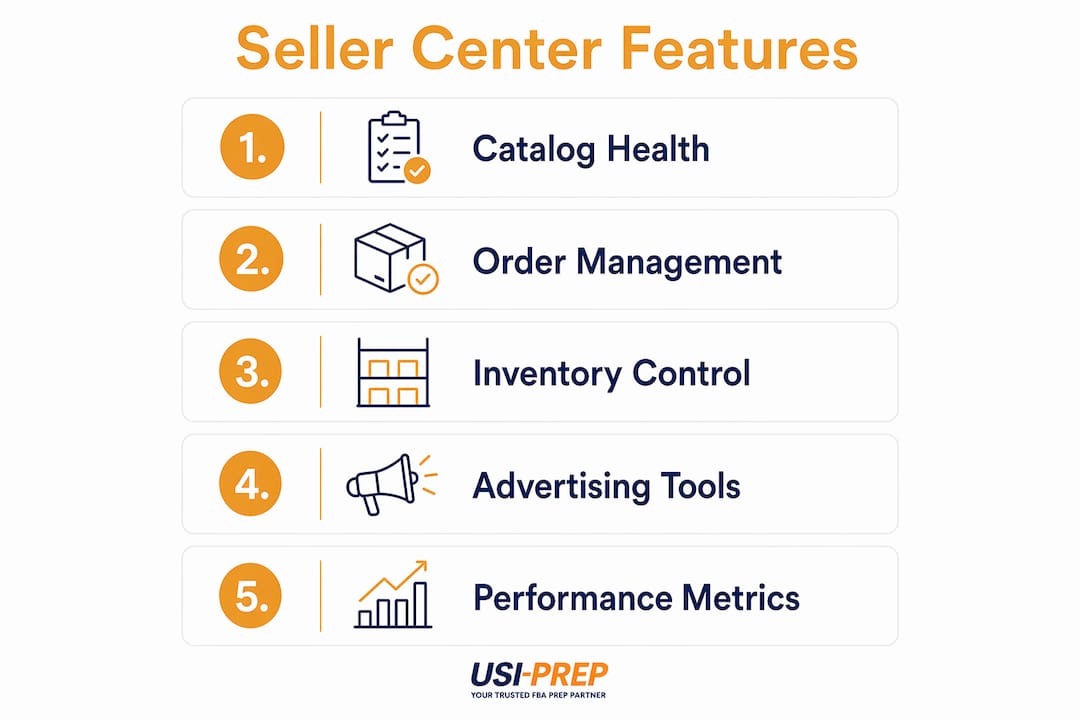
The Seller Center dashboard covers product listings, order processing, inventory management, and advertising tools in one place. That consolidation reduces the number of external tools a small seller needs to run a compliant Walmart operation.
How to manage performance and scale your Walmart business
Performance management is where most small sellers either build a strong Walmart business or get suspended. Walmart tracks your order defect rate and shipping speed with strict thresholds, and the platform enforces these standards to maintain marketplace quality.
Check the Catalog Health and Order Acknowledgement tabs every single day. Catalog Health shows which listings have quality issues that could suppress visibility. Order Acknowledgement shows how quickly you are confirming new orders. Both tabs give you early warning before a small problem becomes an account penalty.
- Set up automated inventory alerts. Manual inventory updates work for small catalogs, but a single oversell creates an order defect. Automated alerts or API sync remove that risk.
- Acknowledge orders within the required window. Walmart measures acknowledgement speed. Build a daily routine or use an integration that auto-acknowledges orders.
- Review your performance scorecard weekly. The dashboard shows trends, not just snapshots. A rising defect rate over three weeks is a bigger problem than one bad day.
- Use API integration for scaling. Once you exceed 50 active SKUs or 20 daily orders, manual management becomes a bottleneck. API connections through approved Solution Providers automate the repetitive work.
- Treat returns as a data source. High return rates on specific SKUs signal listing problems, not just product problems. Review return reasons monthly and update listings accordingly.
Supply chain reliability sits at the center of all of this. If your fulfillment operation cannot ship on time consistently, no amount of dashboard monitoring will save your account. Sellers who outsource to a 3PL provider often see measurable improvements in on-time shipping rates because a dedicated logistics partner focuses entirely on that metric.
Pro Tip: Build a 15-minute daily Seller Center routine: check Order Acknowledgement first, then Catalog Health, then your performance scorecard. That sequence catches 90% of issues before they escalate.
How does Walmart Seller Center differ from other marketplace dashboards?
Walmart Seller Center differs from open marketplace dashboards in one fundamental way: you cannot access it without passing an application review. That approval gate is the single biggest structural difference between Walmart Marketplace and platforms that allow anyone to register and sell immediately.
The approval requirement limits marketplace overcrowding and creates a less saturated environment for sellers who qualify. That is a genuine competitive advantage. Fewer sellers per category means your listings get more organic exposure without paid advertising.
Sellers sometimes confuse Seller Center with Walmart Retail Link. Retail Link is the data portal used by Walmart’s direct wholesale suppliers, not third-party marketplace sellers. If you sell on Walmart.com as a marketplace seller, Seller Center is your platform. Retail Link is not relevant to your operation.
Manual catalog management becomes a real bottleneck once your product range grows. A seller with 10 SKUs can manage everything through spreadsheet uploads. A seller with 500 SKUs needs API automation or an approved Solution Provider to keep inventory accurate and listings current. The Seller Center itself supports both paths, but the manual path has a clear ceiling.
The most common operational pitfalls are order acknowledgement delays and inventory sync errors. Both are avoidable with the right setup. Sellers who treat Seller Center as a passive reporting tool rather than an active management system are the ones who run into account suspensions. Reviewing the Walmart fulfillment requirements before you launch prevents most of these issues from appearing in the first place.
Key Takeaways
Walmart Seller Center is the single platform where approved third-party sellers manage listings, orders, inventory, and performance to build a compliant and growing Walmart Marketplace business.
| Point | Details |
|---|---|
| No monthly fee | Walmart charges referral fees of 6%–15% per category, with no subscription cost. |
| Approval is required | Sellers must pass business verification, supply chain review, and eCommerce history checks. |
| Performance metrics are strict | Order defect rate and shipping speed are tracked daily; falling below thresholds risks suspension. |
| Automation matters at scale | API integration or Solution Providers are necessary once catalog size or order volume grows. |
| Daily monitoring prevents penalties | Checking Catalog Health and Order Acknowledgement tabs daily catches issues before they escalate. |
Why Walmart Seller Center rewards sellers who treat it seriously
I have watched sellers approach Walmart Marketplace the same way they approached every other channel: set it up, list the products, and check back in a week. That approach works on some platforms. On Walmart Seller Center, it gets accounts suspended.
The platform is genuinely well-built for what it does. The performance dashboard gives you clear, actionable numbers. The Catalog Health tab tells you exactly what is wrong with your listings. The Order Acknowledgement system is transparent. Walmart is not hiding the rules. The sellers who struggle are the ones who do not read them.
My honest observation is that the application barrier is an underrated advantage. When I talk to sellers who have been approved, they consistently report better organic visibility and less price competition than they expected. The crowded-marketplace problem that plagues open platforms simply does not exist at the same level on Walmart.
The biggest mistake I see is launching with a supply chain that is not ready for the performance standards. Walmart measures your shipping speed from the moment you acknowledge an order. If your warehouse or prep operation is slow, that clock works against you from day one. Getting your fulfillment operation sorted before you apply, not after, is the move that separates sellers who thrive from sellers who get suspended in their first 90 days.
Start small, prove your metrics, then scale with automation. That sequence works every time.
— Akbar
How Usiprep helps Walmart sellers stay ahead of fulfillment demands
Maintaining strong Walmart Seller Center performance starts with a supply chain that ships on time, every time. Usiprep was founded by former Amazon sellers who understand exactly what marketplace performance standards demand. The company delivers FBA prep and order fulfillment with a 98.9% on-time delivery rate and has helped brands cut fulfillment costs by 30%.
For sellers preparing to launch or scale on Walmart Marketplace, Usiprep offers transparent pricing, fast inventory check-ins, and full visibility throughout the logistics process. Review the prep requirements checklist to make sure your products are ready before your first order arrives. Sellers who want to understand their broader fulfillment options can also read Usiprep’s guide on ecommerce order management to build a process that supports Walmart’s strict performance standards from day one.
FAQ
What is Walmart Seller Center used for?
Walmart Seller Center is the official portal where approved third-party sellers manage product listings, process orders, track inventory, and monitor performance metrics on Walmart Marketplace.
Is there a fee to use Walmart Seller Center?
There is no monthly subscription fee. Walmart charges a referral fee of 6%–15% per sale, depending on the product category.
How do I get approved for Walmart Seller Center?
You must submit an application with a US business Tax ID, a verified address, GS1 GTIN or UPC codes, and documented eCommerce history. Walmart reviews applications manually before granting access.
What products can I sell on Walmart Marketplace?
Walmart allows a wide range of product categories, but each item requires a valid GS1 GTIN or UPC code and must meet Walmart’s content and compliance standards before going live.
How does Walmart Seller Center track performance?
The platform monitors your order defect rate, on-time shipping rate, and order cancellation rate through a built-in performance dashboard. Falling below Walmart’s published thresholds can result in account penalties or suspension.