
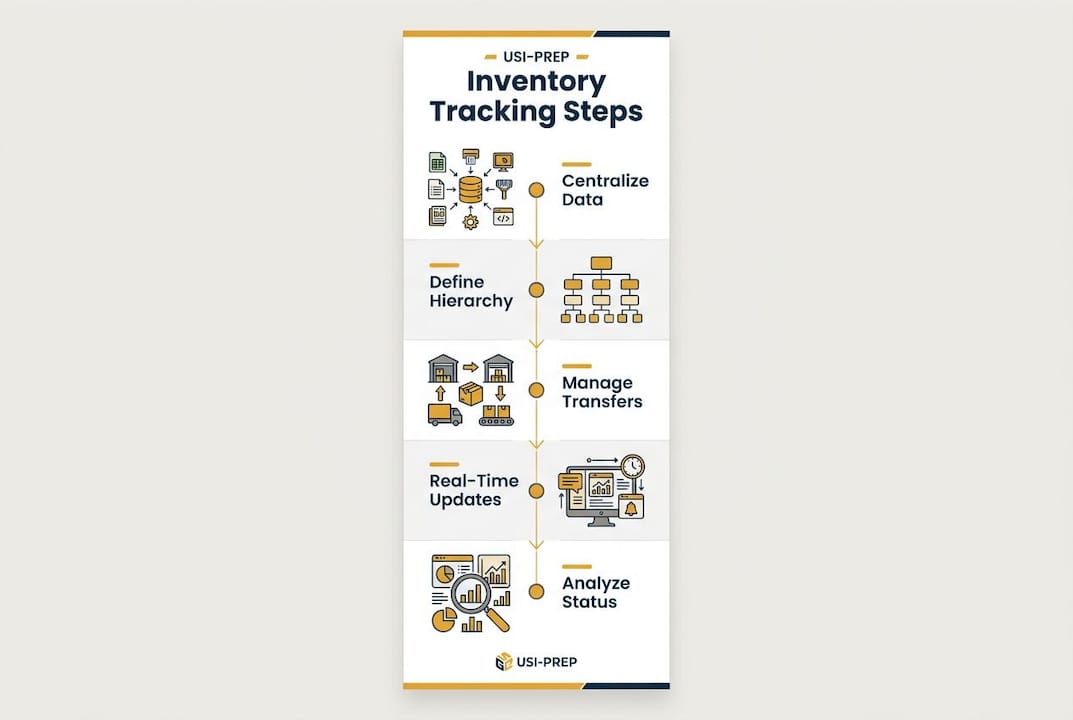
Tracking inventory across fulfillment centers means maintaining a centralized, real-time view of stock levels and movements across every warehouse, 3PL, and distribution point your business uses. Without that unified view, you are flying blind. Consolidating fragmented inventory into a single source of truth can increase sales revenue by up to 60%. That number reflects what happens when your team stops reconciling spreadsheets and starts making decisions from live data. The industry term for this practice is multi-location inventory management, and it is the operational backbone of any e-commerce brand scaling past a single warehouse.
How to track inventory across fulfillment centers: tools and prerequisites
Multi-location inventory management requires the right software architecture before anything else. Inventory visibility software shows stock across warehouses, fulfillment centers, retail locations, and 3PLs in a single dashboard. That unified view is the starting point, not a luxury.
Location hierarchy: the foundation of accuracy
A granular location hierarchy structured as warehouse, zone, aisle, rack, and bin is the foundation for accurate picking, cycle counts, and audits. Without it, your software cannot tell you whether a unit is available to ship or sitting in a receiving zone waiting for inspection. The difference between those two states is the difference between a fulfilled order and an oversell.

What to look for in inventory management software
Good inventory management software for multi-location operations must do more than count units. The table below outlines the features that separate capable platforms from basic tools.
| Feature | Why it matters |
|---|---|
| Real-time sync across locations | Prevents overselling when stock moves between centers |
| Transfer tracking with audit trail | Keeps every movement visible and accountable |
| Bin-level location hierarchy | Enables accurate picking and cycle counts |
| Barcode scan validation | Improves order accuracy to 99.8% at the bin level |
| Pick path optimization | Reduces travel time and pick errors per shift |
| Multi-status stock tracking | Separates on-hand, available, allocated, and quarantined units |
Modern fulfillment platforms can complete new client onboarding in as little as two days, giving you real-time visibility across unlimited locations almost immediately. That speed matters when you are scaling fast and cannot afford weeks of implementation delays.
- Prioritize platforms with native transfer workflows, not just location tags.
- Confirm the software updates both origin and destination stock simultaneously during a transfer.
- Verify that the system supports cycle count scheduling by location zone.
- Check whether the platform integrates with your existing order management and shipping tools.
How do you manage inventory transfers between fulfillment centers?
Transfers between centers are where most multi-location inventory problems begin. Stock leaves one warehouse and effectively disappears until it arrives and gets checked in at the destination. This gap is called a “transfer black hole,” and it causes lost inventory, inaccurate stock counts, and emergency reorders.
The fix is treating every transfer as a fully auditable operation, not an informal movement.
-
Initiate the transfer with defined parameters. Record the source location, destination location, SKU, quantity, and expected arrival date before the stock moves. This creates the transfer record that both locations will reference.
-
Deduct from the source immediately. The originating center’s available stock should drop the moment the transfer is confirmed. Leaving it on the books until arrival creates phantom inventory that can trigger overselling.
-
Create a “in-transit” stock status. The units are not available at either location during transit. Your software should reflect this with a dedicated status so your team does not allocate stock that is on a truck.
-
Update the destination upon receipt. When the receiving center checks in the shipment, the system should automatically add the units to the correct bin location and close the transfer record.
-
Reconcile discrepancies immediately. If the received quantity does not match the transfer record, flag it before closing the transfer. Letting discrepancies sit creates compounding errors across your inventory data.
Treating transfers as first-class, auditable operations is the single most effective way to prevent inventory loss during stock movements. Manual spreadsheets cannot do this reliably. They have no real-time sync, no status tracking, and no automatic reconciliation.
Pro Tip: Set a transfer completion deadline in your software. Any transfer open past 48 hours should trigger an automatic alert to your operations team. Most transfer errors surface within that window, and catching them early prevents cascading stock discrepancies.
How do real-time inventory updates improve fulfillment speed?
Switching to digital, auditable transfer workflows enables e-commerce brands to process orders up to three times faster than manual methods. That speed comes from eliminating the lag between a stock movement and the system reflecting it.
Understanding your four stock statuses
Failing to distinguish between on-hand, available, allocated, and quarantined stock is one of the most common causes of overselling and customer dissatisfaction. Here is what each status means in practice.
On-hand is the total physical count at a location. Available is what can actually be sold. Allocated is reserved for open orders but not yet shipped. Quarantined is stock flagged for inspection or return processing. Mixing these up means you might show 200 units available when only 80 are actually free to ship.
Real-time sync across your fulfillment centers means reorder points trigger automatically when available stock drops below a threshold, not when someone runs a weekly report. That shift alone eliminates a major source of stockouts and the emergency reorder costs that follow. Stock sitting in the wrong location or miscategorized by status drives up reorder costs and erodes your margins.
Best practices for maintaining real-time inventory accuracy:
- Run daily reconciliation reports comparing system counts to physical scans at high-velocity locations.
- Use barcode scanning at every receiving, pick, and transfer touchpoint to eliminate manual entry errors.
- Set automated low-stock alerts by location, not just globally, so you catch regional shortages before they affect shipping times.
- Restrict manual stock adjustments to authorized users and require a reason code for every change.
- Review your order management best practices regularly to keep your fulfillment workflows aligned with your inventory data.
Pro Tip: Configure your software to flag any order that pulls from allocated or quarantined stock. That single rule prevents the majority of mis-ships and customer complaints caused by inaccurate stock status data.
What are the most common challenges in cross-warehouse inventory management?
Multi-location inventory tracking breaks down in predictable ways. Knowing where the failure points are lets you build processes that prevent them.
Transfer black holes are the most common problem. Stock leaves a center, and no one updates the destination until a picker cannot find the units. The solution is mandatory in-transit status tracking and a hard rule that no transfer closes without a confirmed receipt scan.
Reserved versus available confusion causes overselling. When your system does not clearly separate allocated units from available ones, your storefront shows stock that is already committed to open orders. This is a software configuration issue, not a counting problem.
Cycle count gaps let errors accumulate. A full physical count once a year is not enough for a multi-location operation. Granular location hierarchies enable targeted cycle counts by zone or aisle, so you can rotate through your entire warehouse monthly without shutting down operations.
Pick errors compound inventory inaccuracies. Every wrong pick that goes undetected creates a discrepancy between your system count and physical reality. Scan validation at the bin level catches these errors at the moment they happen, before they propagate through your data.
- Audit your location hierarchy quarterly and remove obsolete bin locations that create confusion.
- Schedule zone-based cycle counts on a rotating weekly calendar rather than annual full counts.
- Require scan confirmation for every pick, not just receiving and shipping.
- Document every manual adjustment with a timestamp, user ID, and reason code for full traceability.
Pro Tip: Assign ownership of each warehouse zone to a specific team member. When discrepancies appear in a zone, you have a clear point of contact for investigation. Accountability at the zone level reduces errors faster than any software setting.
Key Takeaways
Accurate multi-location inventory management requires centralized real-time data, auditable transfer workflows, and granular location structures working together across every fulfillment center.
| Point | Details |
|---|---|
| Centralize your inventory data | A single source of truth across all locations prevents overselling and stock discrepancies. |
| Treat transfers as auditable events | Every stock movement needs a source, destination, in-transit status, and confirmed receipt. |
| Distinguish all four stock statuses | Separating on-hand, available, allocated, and quarantined stock eliminates the most common cause of overselling. |
| Use bin-level location hierarchies | Granular location structures enable accurate cycle counts, picking, and real-time audits. |
| Automate alerts and reconciliation | Automated low-stock and transfer alerts catch errors before they affect customer orders. |
Why most inventory problems are really data problems
After working with e-commerce brands at various stages of growth, the pattern is consistent. The brands that struggle with inventory accuracy are not struggling because they have too many products or too many locations. They are struggling because their data lags behind reality.
Systems that work well at $1M in revenue fail at $10M without centralized, real-time inventory visibility. That failure does not announce itself. It shows up as a customer service spike, a sudden stockout on a top SKU, or an audit that reveals 15% of your inventory is in the wrong location. By the time you notice, the damage is done.
The brands that scale without these problems share one habit: they treat every inventory movement as a data event. A transfer is not just a truck leaving a dock. It is a record that must update two locations simultaneously, carry a status through transit, and close with a confirmed receipt. That discipline is what separates a reliable inventory system from a spreadsheet with a false sense of control.
Operational complexity grows faster than visibility when you add locations without upgrading your data infrastructure. The answer is not a bigger team manually reconciling counts. The answer is software that makes every transaction visible the moment it happens, combined with staff who understand why those disciplines matter. Training your warehouse team on why they scan every bin, not just how, is the difference between a process that holds and one that erodes under pressure.
— Akbar
How Usiprep helps you manage inventory across multiple centers
E-commerce brands that need reliable, visible fulfillment operations do not have to build the infrastructure themselves. Usiprep was founded by former Amazon sellers who understand exactly where inventory visibility breaks down at scale.

Usiprep delivers a 98.9% on-time delivery rate and has helped brands cut fulfillment costs by 30% by combining transparent inventory check-ins with real-time operational visibility. Whether you are prepping for FBA or managing multi-center order fulfillment, Usiprep gives you the accuracy and speed your operation needs. Start with the FBA prep requirements checklist to align your inventory prep with best-practice fulfillment standards, and see how Usiprep’s services reduce the errors that cost you margin.
FAQ
What does it mean to track inventory across fulfillment centers?
It means maintaining a centralized, real-time view of stock levels, transfers, and stock statuses across every warehouse or fulfillment location your business uses. The industry term is multi-location inventory management.
Why do inventory transfers cause so many errors?
Transfers create a gap between when stock leaves one location and when it arrives at another. Without a dedicated in-transit status and audit trail, that stock becomes invisible, leading to overselling or lost inventory.
How often should you run cycle counts in a multi-location operation?
Zone-based cycle counts on a rotating weekly schedule are more effective than annual full counts. Granular location hierarchies make it possible to count specific aisles or zones without halting operations.
What is the difference between on-hand and available inventory?
On-hand is the total physical count at a location. Available is what remains after subtracting allocated and quarantined units. Confusing the two is a leading cause of overselling.
How quickly can a fulfillment platform be set up for multi-location tracking?
Modern fulfillment software can complete onboarding in as little as two days, providing immediate real-time visibility across unlimited locations from day one.