
Your shipment landed at the fulfillment center two days ago. The tracking shows “Delivered.” But your inventory still isn’t live, and orders can’t be placed. This is one of the most common sources of confusion in how Amazon FBA check-in works, and it trips up new and experienced sellers alike. The gap between physical delivery and sellable inventory isn’t a glitch. It’s a multi-step receiving process with specific requirements, and not understanding it costs sellers real money in delays, fees, and missed sales windows.
Table of Contents
- Key takeaways
- How Amazon FBA check-in works, step by step
- Common causes of check-in delays and errors
- Best practices for faster, smoother check-ins
- Tracking your shipment in Seller Central
- Shipment type comparison: SPD, LTL, and FTL
- My take on the real complexity of FBA check-in
- Let Usiprep handle the hard part
- FAQ
Key takeaways
| Point | Details |
|---|---|
| Delivery doesn’t mean available | Inventory goes through receiving, scanning, and reconciliation before it’s sellable. |
| Labeling errors are costly | Inaccurate box contents or uncovered barcodes trigger manual fees and multi-week delays. |
| Shipment type changes everything | SPD, LTL, and FTL each have different check-in requirements and timelines. |
| Track status in Seller Central | Use the shipment events tab to monitor progress and know when escalation is warranted. |
| Prep quality determines speed | Accurate packing lists, test-scanned labels, and booked appointments prevent most common holdups. |
How Amazon FBA check-in works, step by step
When your shipment arrives at an Amazon fulfillment center (FC), it doesn’t get processed instantly. Amazon’s receiving operation moves through a defined sequence before your units become available for sale. Here’s what that sequence actually looks like from the inside.
Physical arrival and dock intake. The carrier delivers your shipment to the FC dock. For Small Parcel Delivery (SPD) shipments, this happens without a scheduled appointment. For Less-Than-Truckload (LTL) and Full Truckload (FTL) shipments, the carrier must book a delivery appointment in advance through Amazon’s Carrier Appointment Request (CARP) system. Without that appointment, the truck gets turned away.
Automated and manual scanning. Once inside, cartons go through a scanning process. Amazon’s systems read the FBA shipment labels on each box and match them against your digital shipment plan. Individual units are checked against the SKU or UPC registered in your plan. This is where uncovered manufacturer barcodes cause serious problems. Visible UPC barcodes that weren’t fully covered trigger barcode trap errors, resulting in mis-scanned or rejected inventory.
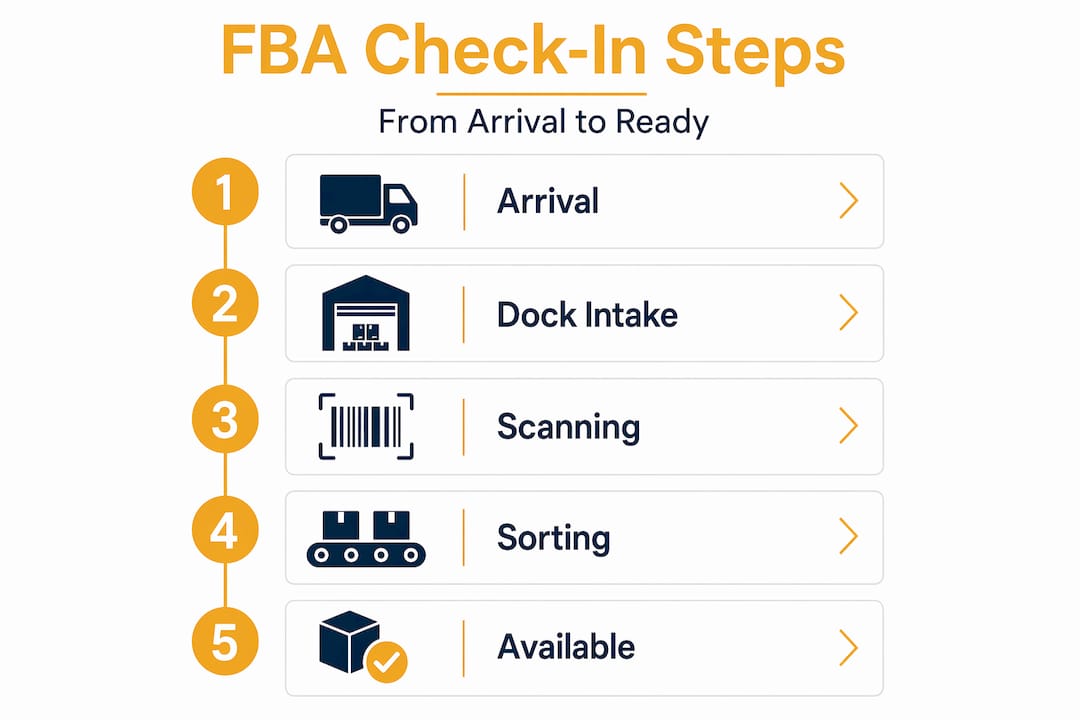
Reconciliation against your shipment plan. Amazon’s system compares what physically arrived against what you declared in Seller Central. This step is where most delays originate. When carton contents don’t match the digital plan, the system flags those units for manual review. Complex reconciliation mismatches can push a shipment into a weeks-long manual investigation queue.
Inventory availability. Only after successful reconciliation does your stock move into “Available” status and become sellable. The typical timeline from delivery to availability looks like this:
- SPD shipments in normal conditions: 2 to 6 days
- LTL/FTL freight shipments: 3 to 10 days depending on pallet prep quality
- Peak season (Q4, Prime Day): 2 to 3 weeks or longer due to volume backlogs
- Shipments flagged for manual review: potentially 3 to 6 weeks
Understanding this timeline is the foundation of good inventory planning. If you’re launching a product or running a promotion, you need to build this window into your restock schedule.
Common causes of check-in delays and errors
Most check-in problems aren’t random. They trace back to a short list of recurring mistakes. Recognizing them is the first step to eliminating them from your operation.
-
Inaccurate box content information. Failing to declare the exact contents of each carton in Seller Central triggers manual processing. The fees are real: $0.15 per standard unit and $0.30 per oversize unit. On a shipment of 1,000 units, that’s $150 to $300 on top of weeks of delay. Many sellers treat box content entry as an afterthought. It’s not.
-
Missing carrier delivery appointments for freight. LTL and FTL shipments require the carrier to book a dock appointment 24 to 72 hours in advance via CARP. If your freight broker or carrier misses this step, the truck gets turned away and rescheduled. Each reschedule adds days to your check-in timeline.
-
Uncovered manufacturer barcodes. If original UPC barcodes are visible on units or outer packaging, Amazon’s scanners read the wrong code. The result is commingled stock, wrong ASINs receiving units, or flat-out rejection. This is a label preparation failure, and it’s entirely preventable.
-
Inaccurate or missing carton and pallet counts. When your delivery appointment lists 20 pallets but 22 show up, shipment holds or rejections at the dock follow. Every number on your paperwork needs to match what physically arrives.
-
Seasonal volume spikes. Amazon FCs operate on a first-in, first-out basis. During high-volume periods like Q4 or Prime Day, FIFO queues back up significantly, and there is no way to expedite your shipment once it’s in the system.
Pro Tip: Inbound failures almost always come from a lack of standardized processes rather than a one-time mistake. If you’ve had a delay once, assume borderline compliance is present elsewhere in your prep workflow and audit the full process, not just the one shipment.
Best practices for faster, smoother check-ins
Getting through check-in quickly isn’t luck. It’s the result of specific preparation steps done consistently before the shipment ever leaves your warehouse or prep center.
-
Audit carton contents against your shipment plan before sealing boxes. The most effective way to avoid manual investigations is to make sure your digital shipment plan matches physical reality exactly. This means counting units per carton, verifying SKUs, and updating any changes in Seller Central before the shipment ships. Exact box content matching is the single highest-leverage thing you can do for check-in speed.
-
Test-scan every label before sealing. Use a barcode scanner to confirm that FBA labels scan correctly and that no manufacturer barcodes are bleeding through packaging. If a scanner in your warehouse misreads a label, Amazon’s automated system will too. Mislabeling and uncovered barcodes create commingled or rejected stock, and fixing that after the fact is far more expensive than preventing it.
-
Confirm carrier appointment booking for all freight shipments. Don’t assume your broker handled it. Call or email to verify the CARP appointment number before the truck departs. Build a 48-hour buffer into your schedule for cases where an appointment slot isn’t immediately available.
-
Use Amazon-partnered carriers whenever possible. Partnered Carrier Program shipments tend to get smoother dock treatment and carry built-in appointment handling for SPD. For freight, they reduce the coordination burden significantly.
-
Standardize your packing process. Consistent carton weights, dimensions, and unit counts per box make reconciliation faster. When every box in a shipment is packed the same way, Amazon’s system can process the entire shipment more predictably.
Pro Tip: If you’re not yet using an FBA prep service to handle labeling, packing, and shipment prep, consider what one compliance error costs you versus the monthly cost of professional prep. For most mid-volume sellers, the math favors outsourcing.
Tracking your shipment in Seller Central
Once your shipment is in transit, your primary tool for monitoring the check-in process is the Shipments section inside Seller Central. Understanding what each status actually means prevents unnecessary panic and helps you act at the right time.
| Status | What it means | Typical next action |
|---|---|---|
| Working | Shipment created, not yet sent | Finalize box contents, print labels |
| Shipped | In transit to FC | No action needed |
| Delivered | Arrived at FC dock | Wait for receiving to begin |
| Receiving | Check-in in progress | Monitor daily |
| Closed | Fully received and reconciled | Verify unit counts vs. shipped |
A shipment can sit in “Delivered” status for anywhere from a day to several weeks before moving to “Receiving.” 2 to 30 days in “Delivered” is considered within normal range at busy FCs. This is the status that most sellers misread as a problem when it’s often just the normal queue.
When should you actually open a support case? Use these markers:
- The shipment has been in “Delivered” status for more than 14 days with no movement
- Your “Receiving” status has been active for more than 21 days with no “Closed” confirmation
- Units received don’t match units shipped after the shipment closes
When you open a case, include the shipment ID, the carrier’s proof of delivery, and the delivery date. Opening a case before the 14-day mark is generally unproductive. Opening cases too early wastes time and generates delays of a different kind as you wait for Seller Support responses that often just tell you to wait.
Shipment type comparison: SPD, LTL, and FTL

How you ship to Amazon directly affects how fast and how complex your check-in will be. Here’s how the three main inbound shipment types compare:
| Factor | SPD | LTL | FTL |
|---|---|---|---|
| Delivery appointment required | No | Yes (24–72 hrs via CARP) | Yes (24–72 hrs via CARP) |
| Typical check-in speed | Fastest | Moderate | Moderate to slow |
| Pallet requirements | None | Yes, standard 40"x48" | Yes, standard 40"x48" |
| Labeling complexity | Box labels only | Box + pallet labels | Box + pallet labels |
| Best for | Small or frequent restocks | Mid-volume shipments | High-volume or full containers |
SPD is the most forgiving for new sellers because it requires no appointment and moves through receiving faster on average. LTL and FTL add freight coordination, pallet standards, and dock scheduling to the process. If you’re shipping freight and haven’t confirmed accurate carton and pallet counts on your delivery documentation, you’re creating risk at the dock before check-in even begins.
My take on the real complexity of FBA check-in
I’ve worked alongside dozens of sellers managing FBA inbound logistics, and the pattern I see most often isn’t a single catastrophic mistake. It’s a quiet accumulation of “close enough” decisions. Labels that are technically readable but slightly misaligned. Box content declarations that are mostly right. Carriers that “probably” booked the appointment.
What I’ve learned is that borderline compliance is the most expensive place to operate. You get just enough shipments through cleanly to believe the process is fine, and then one quarter with high volume or a new product launch exposes every weak link at once.
My advice is to treat the receiving process not as Amazon’s responsibility but as a system you actively manage. The sellers I’ve seen succeed consistently are the ones who audit their prep process quarterly, treat every shipment as a test of their SOPs, and don’t assume that “delivered” means “done.”
The other thing I’d push back on is the instinct to open a Seller Central case the moment something looks slow. I understand the anxiety. But most of the time, the shipment is exactly where it should be, sitting in a queue that moves at the speed of the FC. Patience paired with good documentation beats urgency paired with incomplete information every time.
— Akbar
Let Usiprep handle the hard part
Knowing how the check-in process works is one thing. Executing it flawlessly across every shipment is another challenge entirely, especially when you’re also running your business.
Usiprep was built by former Amazon sellers who experienced these exact frustrations firsthand. Their FBA prep and fulfillment services cover everything that determines check-in speed: accurate carton labeling, full barcode coverage, precise box content declarations, and carrier appointment coordination for freight shipments. Clients who move prep to Usiprep report a 30% reduction in fulfillment costs and a 98.9% on-time delivery rate. If manual processing fees, stalled inventory, or label rejections are showing up in your operation, see how transparent prep pricing compares to what those errors are already costing you.
FAQ
What does “Delivered” status mean in Amazon FBA?
“Delivered” means your shipment has arrived at the fulfillment center dock but has not yet begun the receiving process. It can stay in this status for 2 to 30 days before moving to “Receiving,” particularly at high-volume FCs.
How long does Amazon FBA check-in take?
Under normal conditions, most SPD shipments are checked in within 2 to 6 days. LTL and FTL shipments typically take 3 to 10 days. During peak seasons like Q4, delays of 1 to 3 weeks are common due to FIFO queue backlogs.
What triggers manual processing fees during check-in?
Inaccurate box content information is the primary trigger. Amazon charges $0.15 per standard unit and $0.30 per oversize unit when it must manually process a shipment because the declared contents don’t match what was physically received.
Do I need a delivery appointment for all FBA shipments?
No. SPD shipments do not require a delivery appointment. However, LTL and FTL shipments require the carrier to book a delivery appointment through Amazon’s CARP system 24 to 72 hours in advance. Arriving without an appointment results in the truck being turned away.
When should I open a Seller Support case for a stalled shipment?
Wait at least 14 days after the delivery date before opening a case for a shipment stuck in “Delivered” status. When you do escalate, include your shipment ID, carrier proof of delivery, and the confirmed delivery date to give the support team everything needed to investigate.