
Most Amazon sellers treat FBA shipment creation as a formality. Type in a few numbers, slap on some labels, and send the boxes. Then the delays hit. The extra fees show up. The inventory sits in “receiving” for three weeks right before a major sale. Understanding how FBA shipment creation works at a detailed level is what separates sellers who scale smoothly from those who constantly fight fires with Seller Support.
Table of Contents
- Key takeaways
- How FBA shipment creation works: the planning stage
- Prepping, labeling, and packing your boxes
- Choosing your shipping method and finalizing the shipment
- What happens after you ship
- International shipping and FBA inbound nuances
- My honest take on mastering FBA shipment creation
- How Usiprep helps you get shipments right the first time
- FAQ
Key takeaways
| Point | Details |
|---|---|
| Plan before you ship | Inventory decisions made early in Seller Central directly determine routing, fees, and receiving speed. |
| Labels make or break receiving | Correct FNSKU labels and 2D barcode box content submissions cut processing time significantly. |
| Shipping method matters | SPD works for small loads; LTL is more cost-effective for palletized shipments over 15 boxes. |
| Receiving is not instant | Standard processing runs 5 to 14 business days, so timing your shipments around promotions is critical. |
| International shipments need expert help | Freight forwarders reduce customs errors, stranded inventory, and inbound defect fees on cross-border FBA loads. |
How FBA shipment creation works: the planning stage
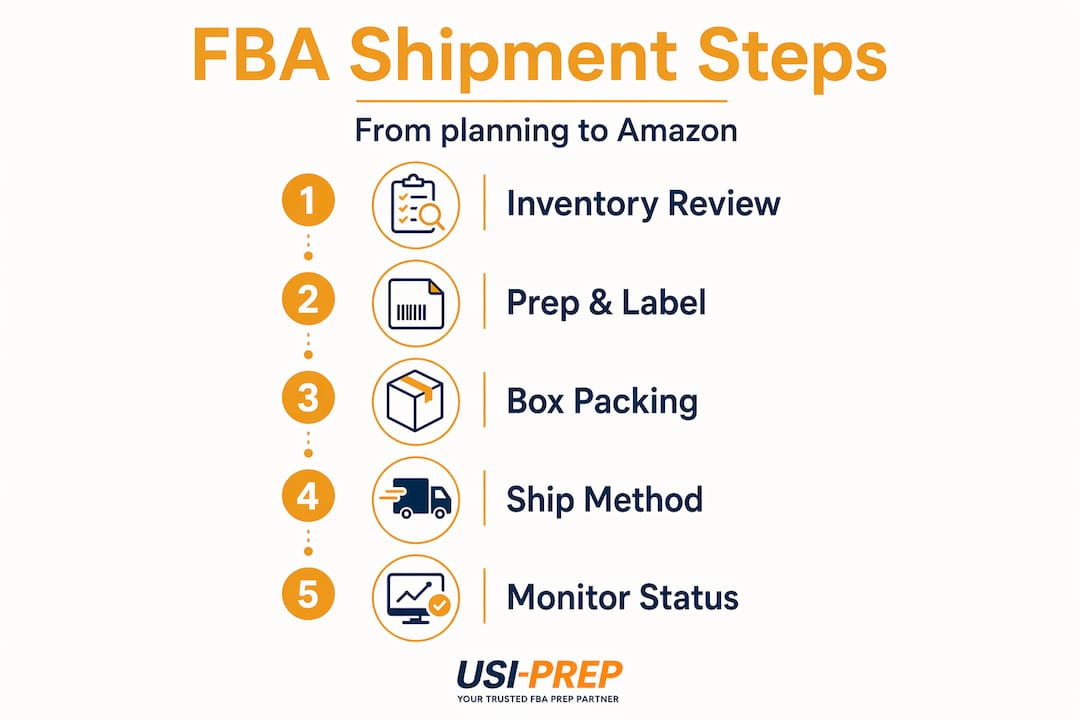
The whole FBA shipment process starts in Seller Central under the “Send to Amazon” workflow. Before you enter a single SKU, you need a clear picture of what you’re shipping and why.
Start by reviewing your sales velocity for each ASIN. Sending too much of a slow mover ties up cash in storage fees. Sending too little of a fast mover leaves you stocked out during your best sales days. Neither is free. The planning phase is where those decisions get locked in.
When you begin a new shipment plan, Amazon asks for your ship-from address. This matters more than it sounds. Incorrect origin addresses cause cascading delays because Amazon uses your location to assign you to the most logical fulfillment center. Getting this wrong reroutes your inventory and adds days to the process.
You will also choose between shipping individual units or case-packed products. Case packs are identical units packed together in manufacturer packaging, and they move through receiving faster. Individual units give you more flexibility when mixing ASINs. Neither is universally better. The right choice depends on your SKU count and how often you mix products in the same shipment.
Amazon may split your shipment across multiple fulfillment centers. You can pay to consolidate (“minimum-split” option) or accept the split for free routing. Consolidation costs money but reduces your operational complexity, especially if you are shipping LTL and managing freight logistics.
- Review demand and sales velocity per ASIN before creating any shipment plan
- Confirm your ship-from address is accurate down to the street level
- Decide between individual and case-packed shipping based on SKU variety
- Evaluate whether paying for consolidated routing is worth it for your volume
- Consider seasonal and promotional timing before locking in quantities
Pro Tip: Create a simple spreadsheet that tracks your current inventory levels, average daily sales per ASIN, and lead times before you ever open Seller Central. This takes 20 minutes and prevents the most common planning mistakes.
Prepping, labeling, and packing your boxes
This is where most sellers make the mistakes that cost them real money. Amazon’s prep requirements are category-specific and non-negotiable. Products that are not prepped correctly get flagged during receiving, which delays your entire shipment. In serious cases, Amazon returns the inventory at your expense.
The basics of product prep break down like this. Items that can be damaged by dust or moisture need poly-bagging. Fragile items need bubble wrap or foam. Loose sets need to be bagged or bundled so they scan as a single unit. Amazon’s packaging standards cover everything from small parts to oversized items, and they vary by category.
FNSKU labeling is the next major checkpoint. Every single unit must have an FNSKU label that matches the exact product variation, including size and color. The FNSKU label needs to cover the manufacturer barcode completely, not just sit next to it. If Amazon scans a manufacturer barcode instead of your FNSKU, your inventory could get commingled with another seller’s units, which is a problem that is very difficult to untangle.

Amazon’s own label service is available at $0.55 per unit. That price adds up quickly on high-volume shipments, so many sellers label in-house or through a prep center. The key is accuracy, not speed.
Packing boxes correctly matters just as much as labeling. The hard rules: no box should exceed 50 pounds, and no single side should exceed 25 inches unless you’re shipping oversize items. Use proper void fill to prevent products from shifting during transit. A box that arrives with damaged products because of poor packing reflects badly on your inbound metrics.
Box content submission is where you tell Amazon exactly what is inside each box. You have two main options: manual entry through the web form or printing 2D barcodes that match your box contents. 2D barcodes dramatically speed up receiving because warehouse staff scan the box once and the system automatically knows what’s inside. Manual entry is slower and leaves more room for human error at the receiving dock.
Pro Tip: Always use 2D barcode labels for box content submission. Print them through Seller Central and tape one to each box. The difference in receiving speed compared to manual entry is measurable, especially during high-volume periods.
Choosing your shipping method and finalizing the shipment
Once your boxes are packed and labeled, you choose how they get to Amazon. The three primary options are Small Parcel Delivery (SPD), Less-Than-Truckload (LTL), and Full Truckload (FTL). Each fits a different volume and cost profile.
| Shipping Method | Best For | Typical Threshold | Key Consideration |
|---|---|---|---|
| SPD | Small shipments | Under 15 boxes | Convenient but higher per-unit cost |
| LTL | Medium to large loads | 1 or more pallets | Requires pallet prep and appointment scheduling |
| FTL | Very large shipments | Full truckloads | Most cost-effective per unit at scale |
Amazon’s Partnered Carrier program is worth using for SPD and LTL if you qualify. Rates through the program are typically lower than retail carrier rates, and tracking integrates directly into Seller Central. The trade-off is that you’re locked into Amazon’s carrier network, which occasionally has capacity issues.
Here is how to finalize your shipment from start to completion:
- Review your shipment summary in Seller Central and confirm all SKUs, quantities, and box counts are accurate.
- Select your shipping carrier and method. Use the Partnered Carrier estimate tool to compare costs.
- Print your box labels from Seller Central and apply one label per box on a flat side, avoiding seams.
- For LTL shipments, print pallet labels and apply all four sides of each pallet at eye level.
- Schedule your freight pickup or drop-off appointment at the destination fulfillment center.
- Enter carrier and tracking information in Seller Central immediately after your shipment leaves.
Missing tracking information is a specific problem worth calling out. Amazon deprioritizes receiving on shipments without active tracking data. Your boxes can be physically sitting at the dock and still get bumped in the queue.
What happens after you ship
Your shipment’s journey does not end when the truck leaves. The receiving process at Amazon can run anywhere from 5 to 14 business days after delivery under normal circumstances. During peak periods like Q4 or Prime Day, that window stretches.
Prime eligibility depends on completed receiving, not just physical arrival at the warehouse. Sellers who build in a 10 to 14 business day buffer before major sales events rarely get caught short. Those who do not plan this buffer frequently end up watching Prime Day pass with inventory stuck in “receiving” status.
The most common reasons for receiving delays include:
- Inaccurate box content information that doesn’t match the physical contents
- Missing or damaged FNSKU labels that prevent unit-level scanning
- Boxes that exceed the 50-pound weight limit and require manual inspection
- Prep errors that require Amazon staff to reprocess the item
- Missing or incorrect shipment tracking data
You need to monitor your shipment status in Seller Central actively. The statuses to watch are “Delivered,” “Receiving,” and “Checked In.” If a shipment sits in “Delivered” for more than four business days without moving to “Receiving,” that is a signal to open a case with Seller Support.
For missing inventory specifically, Amazon requires sellers to file claims proactively. For units valued over $50, Amazon provides dedicated support. For lower-value items, you file the claim yourself through the reconciliation tool in Seller Central. Waiting too long to file significantly extends how long reimbursement takes.
One more timing note: Amazon enforces inbound inventory cutoffs before major events. In 2026, the minimal-split shipment cutoff for Prime Day was May 27. Inventory that arrived after that date was not guaranteed to be Prime-ready in time, even if it physically reached the warehouse before the event.
International shipping and FBA inbound nuances
Shipping internationally into Amazon’s fulfillment network introduces a layer of complexity that catches many sellers off guard. The decision between managing it yourself versus using a freight forwarder is not just about cost. It is about risk.
FBA international shipping does not automatically cost less than self-managed export. Hidden supply chain costs, including storage, repackaging, customs delays, and inbound defect fees, often outweigh the perceived simplicity of letting Amazon handle cross-border logistics.
Professional freight forwarders with FBA expertise handle customs clearance, correct documentation, palletization to Amazon specs, and routing compliance. The ones who specialize in Amazon specifically know which fulfillment centers have the tightest receiving standards and how to prep documentation to minimize hold times.
Key considerations for international FBA shipments:
- Calculate your CBM (cubic meters) before finalizing your shipment plan. Using freight calculators early prevents last-minute rerouting and inbound fee surprises.
- Confirm that your goods are pre-cleared for customs in the destination country before the shipment arrives.
- Have your forwarder confirm Amazon-compliant pallet dimensions and wood treatment certifications for each market.
- Use a freight forwarder who also handles FBA forwarding services with documented experience in your product category.
Pro Tip: Ask any freight forwarder you evaluate for their inbound defect rate with Amazon specifically. A general logistics company with a good overall track record can still have a terrible FBA-specific error rate. The FBA dock has unique requirements that most carriers learn the hard way.
My honest take on mastering FBA shipment creation
I’ve watched sellers spend serious money on ads, photography, and listing optimization, then lose it all in the receiving dock because they treated the “Send to Amazon” workflow like an afterthought. That disconnect is the single most common operational mistake I’ve seen in this business.
In my experience, accurate box-level data is the foundation of everything. It is not glamorous. It does not show up in your advertising dashboard. But getting it wrong compounds fast. One box with incorrect contents creates a discrepancy. That discrepancy triggers a manual audit. That audit delays the entire shipment. By the time everything is resolved, your restock is two weeks late and your rank has dropped.
The mindset trap I see most often is thinking that Amazon will “figure it out.” They will not. Amazon’s receiving process is largely automated, and automation has no patience for ambiguity. If your label is slightly off, the system flags it. If your box content doesn’t match, the scan fails. You do not get a phone call. You get a delay.
What I’ve found actually works is treating the shipment creation process with the same attention you give to product sourcing. Build a repeatable checklist. Audit every step. Use technology where you can, and use prep partners who have proven FBA-specific experience when your volume justifies it.
— Akbar
How Usiprep helps you get shipments right the first time
Getting the FBA shipment process right consistently requires more than reading a guide once. It requires a repeatable system, accurate execution on every shipment, and fast inventory check-in when things arrive. That is exactly what Usiprep was built to deliver.
Founded by former Amazon sellers, Usiprep offers step-by-step shipment support that covers every stage from labeling to box content submission to carrier coordination. Clients see an average 30% reduction in fulfillment costs and a 98.9% on-time delivery rate because Usiprep eliminates the small errors that cause the biggest downstream problems. If you want inventory check-in best practices built into your operation from day one, Usiprep is the partner worth talking to.
FAQ
What is an FBA inbound shipment?
An FBA inbound shipment is the process of sending your inventory from your location to an Amazon fulfillment center, where Amazon stores and ships it to customers on your behalf. It is created through the “Send to Amazon” workflow in Seller Central.
How long does FBA shipment processing take?
Standard FBA receiving takes 5 to 14 business days from delivery. During peak periods like Prime Day or Q4, that window can extend further, so plan your restocking timelines accordingly.
What labels are required for FBA shipments?
Every unit needs an FNSKU label covering the manufacturer barcode, and every box needs a box label printed from Seller Central. LTL pallet shipments additionally require pallet labels applied to all four sides.
What is the difference between SPD and LTL for FBA?
Small Parcel Delivery works best for shipments under roughly 15 boxes and ships through standard carriers like UPS or FedEx. LTL is more cost-effective for palletized loads and requires scheduling a freight pickup or delivery appointment with the fulfillment center.
What happens if my FBA shipment inventory goes missing?
If inventory does not show up after the receiving window closes, file a missing inventory claim through Seller Central’s reconciliation tool. For items valued over $50, Amazon offers dedicated support. For lower-value items, file claims promptly yourself to avoid extended reimbursement delays.