
If you have stock sitting in an Amazon fulfillment center that is not generating a single sale, you may already be dealing with what is Amazon stranded inventory. It is one of the most misunderstood problems in FBA: your products are physically present, Amazon has them in its system, yet buyers cannot purchase them. The result is a slow bleed of storage fees, a dropping Inventory Performance Index (IPI) score, and locked-up capital that could be funding your next purchase order.
Table of Contents
- Key takeaways
- What is Amazon stranded inventory, exactly?
- What causes stranded inventory
- The real cost of stranded inventory
- How to find and fix stranded inventory
- Preventing stranded inventory before it starts
- My take: stranded inventory is a cash flow problem, not a tech problem
- How Usiprep helps you avoid stranded inventory
- FAQ
Key takeaways
| Point | Details |
|---|---|
| Stranded inventory definition | FBA stock in fulfillment centers without an active listing, generating fees but zero revenue. |
| 30-day resolution deadline | Amazon auto-disposes or charges removal fees if stranded stock goes unfixed for 30 days. |
| IPI scores take the hit | Stranded inventory drags your IPI below 400, triggering storage limits that restrict growth. |
| Most causes are preventable | Listing errors, bulk update mistakes, and pricing violations cause the majority of stranded events. |
| Weekly checks beat alerts | Automated notifications miss deadlines; manual reviews of Seller Central prevent costly surprises. |
What is Amazon stranded inventory, exactly?
Stranded inventory is FBA stock physically sitting inside Amazon’s fulfillment centers but without an active, buyable offer attached to it. Amazon’s system holds the product, you keep paying for the space, and customers have no way to add it to their cart. That is the stranded inventory meaning in plain terms.
The distinction between stranded inventory and unfulfillable inventory trips up a lot of sellers:
- Stranded inventory: The product is in good condition and sellable. The problem is the listing, not the item. A missing ASIN, a deleted offer, or a suppressed listing is the culprit.
- Unfulfillable inventory: The product itself is damaged, expired, or otherwise unsellable. Amazon flags it as unable to fulfill, regardless of the listing status.
| Status | Product condition | Listing status | Fees charged | Can be sold? |
|---|---|---|---|---|
| Stranded | Good | Inactive or missing | Yes | Not until fixed |
| Unfulfillable | Damaged or expired | May be active | Yes | No |
| Active FBA | Good | Active | Yes | Yes |
Think of it like a store that locked its doors without telling the stockroom. The shelves are full, the product is fine, but nobody can get in to buy it.
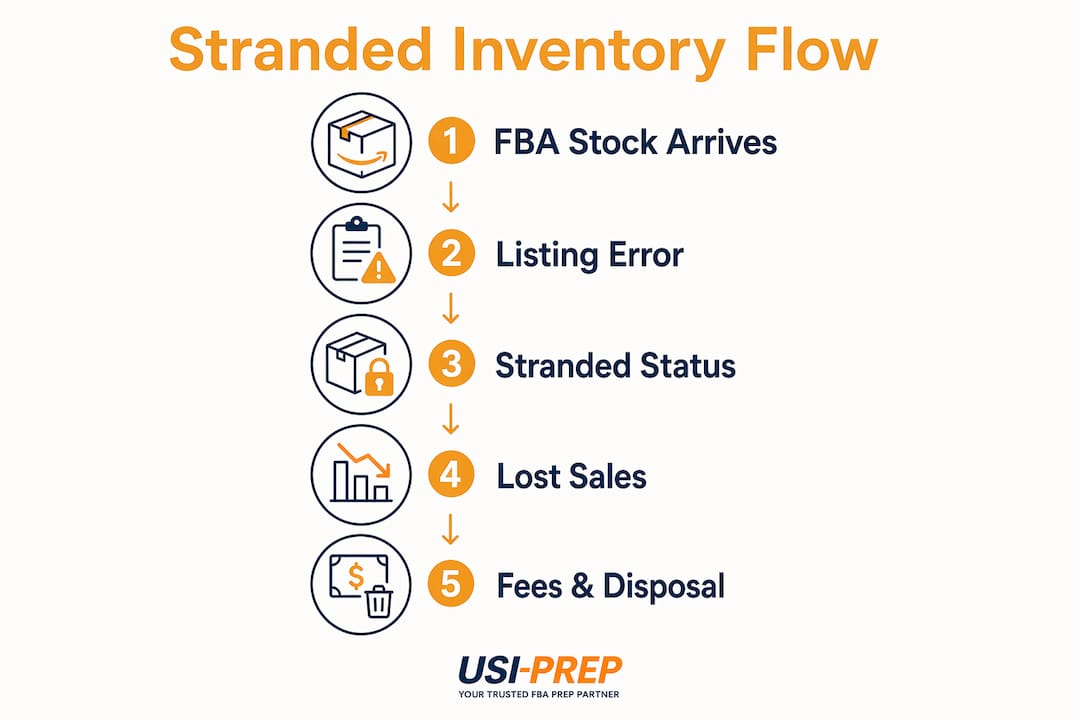
Listings become stranded in several ways: the original offer is closed or deleted, the ASIN is suppressed due to a policy violation, or a seller creates a new listing that does not match the inventory already in the warehouse. Until the disconnect between product and listing is resolved, that stock earns you nothing.
What causes stranded inventory
Understanding what causes stranded inventory is the fastest path to fixing it. The triggers fall into a few predictable categories.
Listing errors are the most common offender. If a seller accidentally closes an offer, deletes a listing, or lets a listing expire, the connected inventory immediately loses its active status. Bulk flat-file uploads are especially risky here. One misformatted cell can wipe out an entire catalog segment.

Pricing policy violations are another frequent cause. Amazon suppresses listings when the price exceeds its fair pricing policy thresholds or when there is no listed price at all. The product stays in the warehouse but vanishes from search results.
Category or ASIN restrictions can also trigger stranded status overnight. If Amazon gates a category you are already selling in, your existing inventory may lose its active listing until you receive approval again. The same happens with hazmat reclassifications, where Amazon updates the dangerous goods status of a product and pulls its listing pending review.
Bulk catalog update mistakes, particularly those made by virtual assistants or agencies, deserve their own mention. VAs managing bulk updates often inadvertently delete or alter listings without fully understanding how those changes cascade through FBA. The listing disappears; the inventory does not.
Pro Tip: Before any bulk catalog upload, download and save the existing flat file as a backup. If a VA or agency manages your listings, require them to test changes on a single ASIN before running a full batch update.
Finally, Amazon system glitches occasionally cause false stranded inventory alerts during site-wide outages. If you suddenly see dozens of ASINs flagged at once, check the seller forums before touching your catalog. A mass edit to fix a false alarm can create real problems.
The real cost of stranded inventory
Most sellers treat stranded inventory as an annoyance. The numbers tell a different story.
Stranded inventory is often misperceived as a minor technical error, but it generates zero revenue while storage fees keep accumulating. On a monthly basis, standard-size items cost roughly $0.78 per cubic foot from January through September. Aged inventory surcharges stack on top of that for units older than 180 days. You are paying to store stock that is making you nothing.
The IPI score consequence is where things get more serious. Stranded inventory is a leading contributor to IPI score drops. IPI scores range from 1 to 1000, and scores below 400 trigger storage limits that restrict how much you can send into FBA. That ceiling directly caps your ability to scale during peak seasons.
“Ignoring stranded inventory leads to lower IPI and restrictive restock limits while sellers wrongly focus only on ads or reviews.” — SupplierWiki via SPS Commerce
Beyond fees and IPI, the capital problem is real. Every unit sitting stranded is cash you cannot redeploy into inventory that actually sells. For sellers using financing, stranded inventory signals buried capital to lenders and can push your account health metrics into territory that triggers a financing review.
Sellers must resolve stranded issues within 30 days, or Amazon may automatically dispose of the stock and charge removal fees calculated by unit size and weight. You could lose inventory you paid full cost to manufacture, source, and ship to Amazon, and then pay again to have it discarded.
How to find and fix stranded inventory
The good news: Amazon gives you a dedicated tool to deal with this. Here is the process step by step.
- Log into Seller Central and go to Inventory, then select Manage Inventory.
- Click the “Fix Stranded Inventory” tab at the top of the page. This view shows all ASINs currently flagged as stranded, along with the reason code for each one.
- Read the reason code carefully. Common reasons include “listing closed,” “no listing,” “listing suppressed,” and “listing inactive.” Each requires a different fix.
- Relist if the issue is fixable in minutes. For a closed or expired listing, you can often click “Sell This Item” directly from the stranded inventory page to create a new offer and reactivate the product.
- Fix the root cause for suppressed listings. If the listing is suppressed due to a pricing violation or missing required attribute, go into the listing editor, correct the issue, and resubmit.
- Create a removal order if the product is slow-moving, discontinued, or the fix would take too long. Getting stock out of FBA stops the fee clock.
- Use the automated settings option to configure delayed removal. Amazon allows sellers to set automated actions with delays from 1 to 30 days, giving you a window to relist before stock is automatically removed.
Pro Tip: Set a weekly calendar reminder to check the Fix Stranded Inventory tab directly. Automated alerts may fail, and missing the 30-day window means paying disposal fees on stock you could have sold.
For catalog issues caused by a bulk upload error, use the Add a Product via Upload feature to submit a corrected flat file. Cross-reference your inventory report with your listings report weekly to catch gaps before they become stranded events. Understanding FBA inventory check-in best practices can also reduce upstream errors that contribute to stranding.
Preventing stranded inventory before it starts
Fixing stranded inventory is manageable. Preventing it is better. These practices keep your catalog clean and your IPI score healthy.
- Run a weekly SKU audit. Compare your active listings against your FBA inventory report every seven days. Any SKU present in FBA but absent from your active listings is a stranded event waiting to happen or already happening.
- Use inventory management software with alert logic. Tools that monitor listing status changes in real time catch problems hours after they occur, not days. Look for software that flags listing suppression events automatically.
- Build a VA and agency protocol. Anyone managing your catalog should follow a written checklist before making bulk changes. Require a backup file before every upload and a sign-off after every batch job. Catalog management errors from bulk updates are among the most preventable causes of stranded inventory.
- Stay ahead of category gating. Monitor your product categories for policy changes. If Amazon updates its compliance requirements for your ASIN type, renewing approval before the deadline means no listing interruption.
- Reconcile after every inbound shipment. Cross-check what you sent against what Amazon received. Discrepancies at check-in can disconnect inventory from listings before you even realize stock has arrived. A solid FBA check-in process prevents these gaps from forming in the first place.
For sellers managing large catalogs or multiple brand lines, a third-party inventory management platform is worth the investment. The cost of one month of aged inventory surcharges on a stranded ASIN often exceeds a year of software subscription fees.
My take: stranded inventory is a cash flow problem, not a tech problem
I have worked with enough Amazon sellers to see the same pattern repeat: stranded inventory gets labeled an IT issue and handed to a VA to clean up once a quarter. That framing is exactly why so many sellers bleed money they never trace back to this specific cause.
In my experience, the sellers who treat stranded inventory as a financial metric, not an admin task, are the ones who catch problems within 24 to 48 hours and almost never hit Amazon’s 30-day disposal deadline. The ones who rely on automated alerts miss issues for weeks at a time.
What I have found actually works is assigning one person to own the Fix Stranded Inventory tab the same way someone owns ad spend. You review it Monday morning, you fix anything flagged, and you document the cause. After a few months, you will have a pattern. Maybe 70% of your stranded events come from one VA’s flat-file process. Maybe a specific product category keeps triggering pricing suppression. You fix the pattern, not just the symptom.
The lender angle is also underappreciated. Stranded stock as buried capital is not just a metaphor. When you are trying to access credit to fund growth and your account health dashboard shows persistent stranded inventory, lenders see a business that cannot manage its own assets. That perception costs you money beyond the storage fees.
Mastering this area does not require sophisticated tools. It requires treating stranded inventory with the same urgency you give to a listing that drops off page one.
— Akbar
How Usiprep helps you avoid stranded inventory

Stranded inventory often starts before stock even hits Amazon’s warehouse. Labeling errors, shipment prep mistakes, and poor check-in processes create the catalog disconnects that strand products. Usiprep was built by former Amazon sellers who have lived through exactly these problems.
Usiprep’s FBA prep and fulfillment services include a detailed FBA shipment checklist that catches labeling and packaging issues before they cause downstream listing problems. With faster inventory check-ins, complete shipment visibility, and a 98.9% on-time delivery rate, Usiprep gives you the operational foundation that reduces stranded inventory risks at the source. Many clients see a 30% reduction in fulfillment costs while gaining the transparency to spot issues early.
If you want to stop paying storage fees on inventory that should be selling, explore Usiprep’s FBA services and see how professional prep changes the upstream picture.
FAQ
What does stranded inventory mean on Amazon?
Stranded inventory is FBA stock physically located in Amazon’s fulfillment centers but without an active product listing attached to it. Buyers cannot purchase the item, yet storage fees continue to accumulate until the seller fixes the listing or removes the stock.
How long do you have to fix stranded inventory?
Amazon gives sellers 30 days to resolve stranded inventory before it may be automatically disposed of or removed, with fees charged based on unit size and weight. You can configure a delay removal option in Seller Central to extend your response window up to 30 days.
What causes stranded inventory on Amazon?
The most common causes include deleted or closed listings, suppressed listings from pricing violations, category restrictions, and bulk catalog upload errors. System glitches can also trigger false stranded alerts, so verify the issue before making catalog changes.
Does stranded inventory affect your IPI score?
Yes. Stranded inventory is a direct contributor to IPI score drops, and scores below 400 trigger storage limits that restrict how much inventory you can send into FBA, which limits your ability to scale.
How do you fix stranded inventory in Seller Central?
Go to Inventory, then select the Fix Stranded Inventory tab in Seller Central. Each stranded ASIN shows a reason code. From there, you can relist the item, correct the listing issue, or create a removal order to stop ongoing storage fees.